Running on Quantinuum Backends
In this tutorial, we demonstrate how to perform a simple quantum chemical calculation on Quantinuum Systems.
Since this tutorial focuses on practical quantum computation, we will perform a simple calculation: the single point (i.e. not optimized/not variationally solved) total energy evaluation of the H2 molecule in the Unitary Coupled Cluster (UCC) ansatz for a set value of the ansatz variational parameter.
Accessing the backends in this tutorial requires credentials for Quantinuum Systems. If you are interested in gaining access to Quantinuum Systems, here is our expression of interest form. In most cases, hardware quantum credits (HQC) are required to run on the emulators and hardware used here.
The main way to specify a Quantinuum backend is through qnexus, the Python client for interacting with Quantinuum Nexus, our cloud based platform for quantum computing.
While not used here, pytket-quantinuum provides access to a local, noiseless backend that is useful for local circuit compilation.
This tutorial is broken down into the following sections:
Define the system
Perform computation with emulator
Demonstrate error mitigation methods on emulated hardware (PMSV)
1. Define the system
# Preload the Hamiltonian for H2
# see the Aer tutorial for details
from inquanto.express import load_h5

h2 = load_h5("h2_sto3g.h5", as_tuple=True)
hamiltonian = h2.hamiltonian_operator

from inquanto.spaces import FermionSpace
from inquanto.states import FermionState
from inquanto.symmetry import PointGroup
from inquanto.ansatzes import FermionSpaceStateExpChemicallyAware

# Define fermion space, state, and map the fermionic operator to qubits
space = FermionSpace(
    4, point_group=PointGroup("D2h"), orb_irreps=["Ag", "Ag", "B1u", "B1u"]
)

state = FermionState([1, 1, 0, 0])
qubit_hamiltonian = hamiltonian.qubit_encode()

exponents = space.construct_single_ucc_operators(state)
## the above adds nothing due to the symmetry of the system
exponents += space.construct_double_ucc_operators(state)
# Construct an efficient ansatz
ansatz = FermionSpaceStateExpChemicallyAware(exponents, state)

p = ansatz.state_symbols.construct_from_array([0.4996755931358105])
print(p)

# Import an InQuanto Computable for measuring an expectation value.
# The operator is the qubit Hamiltonian, and the wavefunction is the ansatz.
from inquanto.computables import ExpectationValue

print(hamiltonian)
expectation0 = ExpectationValue(ansatz, hamiltonian.qubit_encode())

# Analyze the ansatz circuit
from pytket.circuit.display import render_circuit_jupyter
from pytket import Circuit, OpType

render_circuit_jupyter(ansatz.get_circuit(p))  # this is the uncompiled ansatz circuit

print("2-qubit GATES:  {}".format(ansatz.circuit_resources()['gates_2q']))
print(ansatz.state_circuit)
{d0: 0.4996755931358105}
<inquanto.operators._chemistry_integral_operator.ChemistryRestrictedIntegralOperator object at 0x1419036e0>
2-qubit GATES:  4
<tket::Circuit, qubits=4, gates=31>
2. Machine emulation for quantum noise
Running emulator experiments before hardware experiments is a crucial step in the development and optimization of quantum algorithms and applications. Emulators provide a controlled environment where one can fine-tune algorithms, explore error mitigation strategies, and gain valuable insights about the behavior of quantum circuits without some constraints of the physical hardware.
Below, we provide instructions for conducting experiments utilizing a Quantinuum emulator. To utilize hardware instead of the emulator one only needs to change their choice of device when instantiating the QuantinuumConfig.
QuantinuumConfig is a qnexus configuration object that points to Quantinuum Systems this includes all emulators and hardware. Emulators are run on remote compute either on Nexus or on site in Colorado. While both H2-1E and H2-Emulator are honest emulators of the H2-1 device, submission to H2-1E consumes HQCs. We demonstrate the user of H2-1E here but it is often advisable to start with the H2-Emulator to save HQC and queue time, this comes at the cost of reducing the maximum number of qubits one can use to 26.
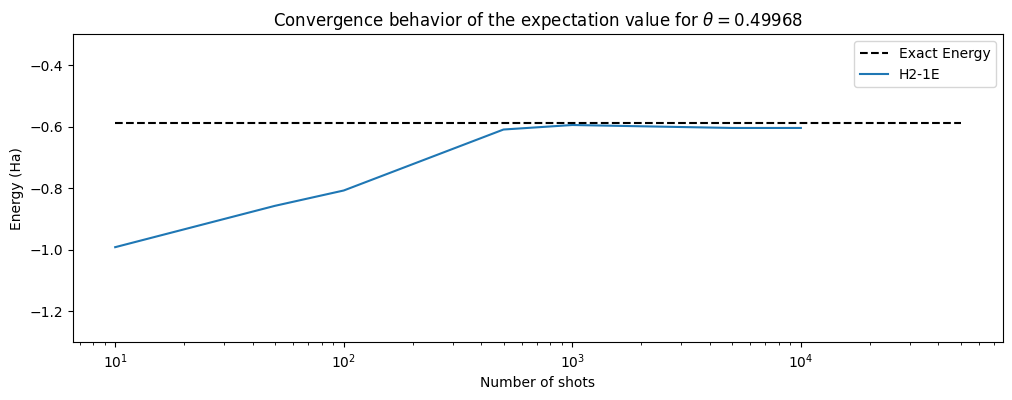
For comparison in the figure below, we have also plotted the exact energy (-0.5876463677224993 Ha) for H\(_2\) and the user should also compare these results to result from the first part of this tutorial.
from qnexus.client import auth, projects, devices
from qnexus import QuantinuumConfig

# Login with your credentials
# You only need to login once per session, then this can be commented out
# auth.login()

# qnexus requires the specification of a project for all submitted jobs
project_ref = projects.get_or_create(name="InQuanto Documentation", description="", properties={})

# Change the machine name if necessary.
machine = "H2-1E"
backend = QuantinuumConfig(device_name=machine)

print(machine, "status:", devices.status(backend))
H2-1E status: DeviceStateEnum.ONLINE
from inquanto.protocols import PauliAveraging
from pytket.partition import PauliPartitionStrat

# here we demonstrate building the
noisy_protocol = PauliAveraging(
    backend,
    shots_per_circuit=10000,
    pauli_partition_strategy=PauliPartitionStrat.CommutingSets,
    project_ref=project_ref
)
noisy_protocol.build(p, ansatz, hamiltonian.qubit_encode())
noisy_protocol.compile_circuits()
<inquanto.protocols.averaging._pauli_averaging.PauliAveraging at 0x141cca900>
# you can inspect compiled measurement circuits contained in the protocol that was run on the backend
# note that the gateset of this circuit is different to the ansatz

render_circuit_jupyter(noisy_protocol.get_circuits()[1])
noisy_handles = noisy_protocol.launch()
# Retrieve the results of the 10000 shot job once it has completed
noisy_results = noisy_handles.get_results()
Here we employ the BackendResultBootstrap class of inquanto.protocols to resample the results of 10000 executed shots for a number of different sample sizes. First, we asynchronously launch and retrieve the job with 10000 shots then apply the resampling.
from inquanto.protocols import BackendResultBootstrap

sample_sizes = [10, 50, 100, 500, 1000, 5000]
noisy_H2_1E_energies = []

for i in sample_sizes:
    # One sample, seed = 0 (default), with i number of shots
    resample = BackendResultBootstrap(1, 0, i)
    resampled_result = resample.get_sampled_results(noisy_results)
    noisy_H2_1E_energies.append(noisy_protocol.retrieve(resampled_result[0]).evaluate_expectation_value(
        ansatz, hamiltonian.qubit_encode()))

# Append the expectation value of the 10000 shots result
noisy_H2_1E_energies.append(noisy_protocol.evaluate_expectation_value(
    ansatz, hamiltonian.qubit_encode()
))
import matplotlib.pyplot as plt
# we plot the results of our sampling
plt.rcParams["figure.figsize"] = (12, 4)

shots_set = sample_sizes.copy()
shots_set.append(10000)

plt.hlines(
    y=-0.5876463677224993,
    xmin=10,
    xmax=50000,
    ls="--",
    colors="black",
    label="Exact Energy",
)
plt.plot(shots_set, noisy_H2_1E_energies, label="H2-1E")
plt.xscale("log")
plt.ylim([-1.3, -0.3])
plt.xlabel("Number of shots")
plt.ylabel("Energy (Ha)")
plt.title(
    "Convergence behavior of the expectation value for "
    + r"$\theta=$%.5f" % list(p.values())[0]
)
plt.legend()
<matplotlib.legend.Legend at 0x147f37200>
3. Noise mitigation methods in Quantinuum emulation
We can use noise mitigation techniques to reduce the impact of noise in our expectation value. In this case we will ‘purify’ results by discarding a shot if it has a certain error. There are many other mitigation methods.
Specifically, we will define the symmetries of the Qubit Operators in the system to use PMSV (Partition Measurement Symmetry Verification). As a result, noise mitigation improves the accuracy of the energy obtained from the quantum hardware compared to the unmitigated results and the exact energy of H2.
State Preparation and Measurement (SPAM) correction, which calibrates the calculation for system noise, can also be used.
from inquanto.protocols.averaging._mitigation import PMSV
from inquanto.mappings import QubitMappingJordanWigner


stabilizers = QubitMappingJordanWigner().operator_map(
    space.symmetry_operators_z2_in_sector(state)
)

mitms_pmsv = PMSV(stabilizers)

miti_protocol = PauliAveraging(
        backend,
        shots_per_circuit=10000,
        pauli_partition_strategy=PauliPartitionStrat.CommutingSets,
        project_ref=project_ref
    )
miti_protocol.build(
        p, ansatz, hamiltonian.qubit_encode(), noise_mitigation=mitms_pmsv
    )
miti_protocol.compile_circuits()
handles = miti_protocol.launch()
miti_results = handles.get_results()
miti_H2_1E_energies = []

# Once again we apply BackendResultBootstrap to resample 10000 shots
for i in sample_sizes:
    # One sample, seed = 0 (default), with i number of shots
    resample = BackendResultBootstrap(1, 0, i)
    resampled_result = resample.get_sampled_results(miti_results)
    miti_H2_1E_energies.append(miti_protocol.retrieve(resampled_result[0]).evaluate_expectation_value(
        ansatz, hamiltonian.qubit_encode()))

# Append the expectation value of the 10000 shots result
miti_H2_1E_energies.append(miti_protocol.evaluate_expectation_value(
    ansatz, hamiltonian.qubit_encode()
))
#statevector
plt.hlines(
    y=-0.5876463677224993,
    xmin=10,
    xmax=50000,
    ls="--",
    colors="black",
    label="Exact Energy",
)
plt.plot(shots_set, noisy_H2_1E_energies, label="H2-1E")
plt.plot(shots_set, miti_H2_1E_energies, label="H2-1E mitigated")
plt.xscale("log")
plt.ylim([-1.3, -0.3])
plt.xlabel("Number of shots")
plt.ylabel("Energy (Ha)")
plt.title(
    "Convergence behavior of the expectation value for "
    + r"$\theta=$%.5f" % list(p.values())[0]
)
plt.legend()
<matplotlib.legend.Legend at 0x147f9fc20>
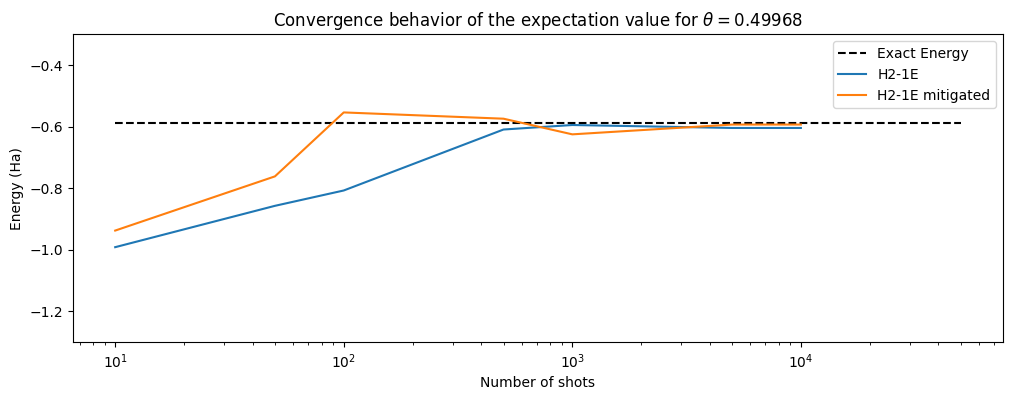
One may also explore the impact of SPAM on enhancing the convergence behavior of the expectation value. In the case of this simple system with a shallow circuit, the energy converges with slightly improved efficiency and/or heightened precision upon employing noise mitigation techniques.
Transitioning to hardware experiments is straightforward. The user simply changes the device name (e.g., from “H2-1E” to “H2-1”), and the circuit will be run on the physical quantum device provided sufficient credits and circuit syntax.