Native Parameterized Angle Hardware Gates
Native gates are gates on a quantum computer that the hardware physically executes. Different quantum computers may have different gates that are physically executed on the hardware. Writing a gate in a quantum circuit submitted to hardware doesn’t guarantee its physical execution on the device. For instance, on Quantinuum quantum computers, a Hadamard gate written in the circuit is not the actual gate executed. When users submit circuits using a Hadamard gate, the gate is translated into a \(U_{1q}\) gate followed by a \(Rz\) gate, which the ion trap device physically executes.
The Quantinuum hardware compiler handles the translation from circuits users submit to the native gates run on hardware. In the Quantum Charge-Coupled Device (QCCD) architecture, the hardware compilation includes the assignment of which physical qubit corresponds to which qubit in a circuit as well as how qubits will be transported around the device. Since transport, as well as gating, incurs a small amount of error with each operation, the compiler aims to minimize the number of gates that need to be executed.
This article showcases consumption of the \(SU(4)\) gate with a Quantum Volume Test (QVT) use case. QVT is an important system benchmark the assess the quality of a quantum computer.
Parameterized Angle ZZ Gates
Quantinuum System Model H1’s native gate set includes parameterized angle \(R_{ZZ}\) gates. This is beneficial for reducing the 2-qubit gate count for many quantum algorithms and gate sequences.
Quantum circuits that use the gate sequence CNOT, RZ, CNOT can be replaced with the parameterized angle ZZ gate, shown below. parameterized angle two-qubit gates can be used to improve fidelity of the output and to decrease two-qubit gate depth. Specifically, the error from parameterized angle two-qubit gates is less than the fixed-angle two-qubit gate for small angles. The error from both gates is the same at angle \(\frac{\phi}{2}\). The error from parameterized angle two-qubit gates increases with angle size.
OpType.Rz and OpType.CX operations in pytket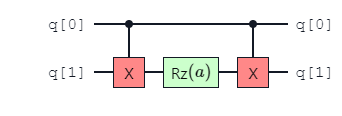
OpType.ZZPhase (\(RZZ(\theta)\)) operation in pytket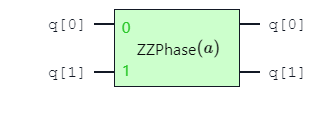
The \(R_{zz}\) gate is available in Pytket as OpType.ZZPhase. This is a 2-qubit gate which requires 2 qubits and 1 angle (half-turns) as inputs.
This gate can be used as follows within Pytket.
from pytket.circuit.display import render_circuit_jupyter
from pytket.circuit import Circuit
from sympy import Symbol

symbol = Symbol("a")
circuit = Circuit(2)
circuit.ZZPhase(symbol, 0, 1)
render_circuit_jupyter(circuit)
Parameterized Angle SU(4) Gates
The General \(SU(4)\) Entangler gate is available in Pytket as OpType.TK2. This gate is a combination of OpType.XXPhase, OpType.YYPhase and OpType.ZZPhase, and requires three angles as input, \(\alpha\), \(\beta\) and \(\gamma\). The definition of the gate is provided below:
This gate can be used as follows within Pytket.
from pytket.circuit.display import render_circuit_jupyter
from pytket.circuit import Circuit
from sympy import Symbol

symbols = [Symbol("a"), Symbol("b"), Symbol("c")]
circuit = Circuit(2)
circuit.TK2(*symbols, *circuit.qubits)
render_circuit_jupyter(circuit)
Submission of the gate requires the desired native two-qubit gate to be specified in qnexus.QuantinuumConfig via the keyword argument, target_2qb_gate. Three values can be supplied as a string:
TK2: to use the parameterized angle \(SU(4)\) gate;ZZPhase: to use the parameterized angle \(ZZ\) gate;ZZMax: to use the fixed-angle \(ZZ\) gate.
import qnexus

compiler_options_input = lambda name: {"target_2qb_gate": name}

config_tk2 = qnexus.QuantinuumConfig(device_name="H1-1E", compiler_options=compiler_options_input("TK2"))
config_zzphase = qnexus.QuantinuumConfig(device_name="H1-1E", compiler_options=compiler_options_input("ZZPhase"))
config_zzmax = qnexus.QuantinuumConfig(device_name="H1-1E", compiler_options=compiler_options_input("ZZMax"))
Quantum Volume Test
Quantum volume is a benchmarking test that was initially proposed by IBM (arXiv:1811.12926). It is a test that aims to verify the quality as well as the quantity of qubits on the machine. The test does this by performing rounds of single and two qubit gates between random pairs of qubits for as many rounds as qubits in the test. For example, for quantum volume of \(2^N\) where \(N=4\), there are 4 layers of repeated operations over 4 qubits. It verifies the quantum computer can perform quality computation with reasonable-sized circuits. The advantage to using quantum volume is that it gives users the confidence that not only do they have the number of qubits to support running their circuit, but the two-qubit gate fidelity meets the threshold to support circuits of significant depth as well. Quantum algorithms need not only qubits, but the ability to run many gates. Quantinuum has steadily been increasing the quantum volume of Quantinuum machines.
First we import the functions we need in Pytket.
import numpy as np

from pytket import Circuit, OpType
from pytket.circuit.display import render_circuit_jupyter
To run a circuit containing the general \(SU(4)\) gate on Quantinuum machines, the configuration for QuantinumConfig needs to have OpType.TK2 set as the native two-qubit gate. This is accomplished by setting target_2qb_gate, compilation and execution with OpType.TK2 is enabled.
import qnexus

config_tk2 = qnexus.QuantinuumConfig(device_name="H1-Emulator", target_2qb_gate="TK2")
config_zzphase = qnexus.QuantinuumConfig(device_name="H1-Emulator", target_2qb_gate="ZZPhase")
A new project is defined for the \(SU(4)\) use-case.
project = qnexus.projects.get_or_create(
    "qvt_usecase",
    description="Project containing job data for Quantum Volume Test use-case"
)
qnexus.context.set_active_project(project)
To set up the Quantum Volume test, we start by building up the repeated circuit elements. The function in the code cell below defines a pytket Circuit Box with pytket.circuit.CircBox. Circuit Boxes are useful for composing larger circuits from smaller subcircuits that utilize the same set of gates.
The Circuit box below contains a blueprint for the decomposition of a random general \(SU(4)\) unitary distributed with the Haar Measure into a circuit primitive over 2 qubits. The implementation is based on arxiv.0609050. The random \(SU(4)\) unitary is generated using scipy.stats.unitary_group.
from pytket.circuit import CircBox, Circuit, Unitary2qBox
import numpy as np
from scipy.stats import unitary_group


def haar_random_su4_box() -> CircBox:
    r = unitary_group.rvs(dim=4)
    r[0, :] /= np.linalg.det(r)
    circuit = Circuit(2)
    box = Unitary2qBox(r)
    circuit.add_unitary2qbox(box, 0, 1)
    return CircBox(circuit)
Circuit Boxes can be visualized utilizing the get_circuit function.
from pytket.circuit.display import render_circuit_jupyter

circuit = haar_random_su4_box().get_circuit()
render_circuit_jupyter(circuit)
In the cell below, the CircBox is inspected and further optimisations are applied. DecomposeBoxes simplifies OpType.CircBox operations into the underlying gate operations recursively. Further decompositions are performed with the KAKDecomposition function. We specify use the OpType.TK2 gate in this function call as the target 2-qubit gate after decomposition.
The pytket sequence pass, consists of two passes:
Both passes are arguments to pytket.passes.SequencePass. SequencePass allows both passes to be applied to the input circuit with one apply call.
from pytket.passes import DecomposeBoxes, KAKDecomposition, SequencePass
from pytket.circuit import OpType

sequence_pass = SequencePass(
    [DecomposeBoxes(), KAKDecomposition(target_2qb_gate=OpType.TK2)]
)
sequence_pass.apply(circuit)
render_circuit_jupyter(circuit)
Now we’re ready to set up a Quantum Volume test circuit using the Circuit Box we created. The steps to set up the circuit are straightforward using the CircBox instances to build up the full circuit.
circuit = Circuit(4)
for _ in range(4):
    permutation = np.random.permutation(circuit.qubits)
    for i in range(0, 4, 2):
        box = haar_random_su4_box()
        circuit.add_circbox(box, [permutation[i], permutation[i + 1]])
circuit.measure_all();
The SequencePass defined in the code cell in the previous subsection is used below on the QVT circuit and we can see the full set of gates in the circuit as well as the result of optimizations performed by KAKDecomposition.
from pytket.circuit.display import render_circuit_jupyter

sequence_pass.apply(circuit)
render_circuit_jupyter(circuit)
ref_su4 = qnexus.circuits.upload(circuit=circuit, name="su4_circuit")
ref_compile_job_tk2 = qnexus.start_compile_job(
    circuits=[ref_su4],
    name="compilation-tk2-job",
    backend_config=config_tk2,
    optimisation_level=2
)
qnexus.jobs.wait_for(ref_compile_job_tk2, timeout=1000)
ref_compile_circuit_tk2 = qnexus.jobs.results(ref_compile_job_tk2)[0].get_output()
compiled_circuit_tk2 = ref_compile_circuit_tk2.download_circuit()
from pytket.circuit.display import render_circuit_jupyter

render_circuit_jupyter(compiled_circuit_tk2)
ref_execute_job_tk2 = qnexus.start_execute_job(
    circuits=[ref_compile_circuit_tk2],
    name="execution-tk2-job",
    backend_config=config_tk2,
    n_shots=[100]
)
qnexus.jobs.wait_for(ref_execute_job_tk2, timeout=1000)
result_tk2 = qnexus.jobs.results(ref_execute_job_tk2)[0].download_result()